
At Stellar Oaks Virtual Academy, families reach teachers through the student portal, email, and optional live lessons rather than hallway conversations. Because coursework is asynchronous, communication has to be deliberate to make sure your student stays on track: set expectations in week one, ask specific questions, and reach out before a grade slips.
Why Communication Works Differently in Virtual School
In a traditional classroom, communication often happens by accident: a quick word after the bell, a note sent home in a backpack. Virtual school does not have those built-in moments, which means communication has to become intentional instead of incidental. That is not a downside. Once families understand the rhythm, it tends to work better than the old drive-by version.
Stellar Oaks is a tuition-free public virtual school serving Iowa students in grades K through 12, authorized through the Red Oak Community School District. Students work asynchronously and can complete assigned lessons at any time, with optional daily live lessons on top of that. That flexibility is a real advantage, but it also means there’s no teacher standing at the front of a room waiting to notice a confused expression.
What the Research Says
Researchers who studied the shift to online classrooms found that communication challenges were a common source of stress, largely because missing visual cues make it harder to tell how a message is landing. The fix is surprisingly simple: default to assuming kindness, and ask a clarifying question before assuming the worst.
Who to Contact for What at Stellar Oaks
Your Student's Iowa-Licensed Teacher
Every course is taught by an Iowa-licensed teacher who owns instruction, grading, feedback, and deadline decisions in that class. Anything about coursework starts here.

The Student Success Specialist
Your Success Specialist is a counselor assigned to guide your family from enrollment to graduation. They handle anything that spans more than one class: time management, a student struggling across the board, or a problem you cannot pin to a single course.
Your Learning Coach
The Learning Coach is the adult at home who keeps the schedule moving and notices when something is off. Our Learning Coach quick-start guide covers what the role actually involves.
The School Counselor
Counselors handle course placement, credit and graduation planning, and post-secondary questions. For high school families, an early conversation about credits and CTE pathways beats a late one.
The Principal
Justin Williams is the K-12 Principal and Director of Academics at Stellar Oaks, and the right contact when an issue has not been resolved at the teacher or support level. You can meet Justin here.
Where Communication Happens
The Student Portal and Gradebook
The student portal is the single best habit to build in week one. It shows grades, assignment status, and teacher feedback in near real time, so you can see a problem forming instead of learning about it after the fact. Check it once or twice a week on a fixed rhythm.
The Support Portal and Help Tickets
Tech issues, access problems, and account questions route through the Stellar Oaks support portal as a help ticket, not to a teacher. A teacher can explain an assignment but cannot reset a login.
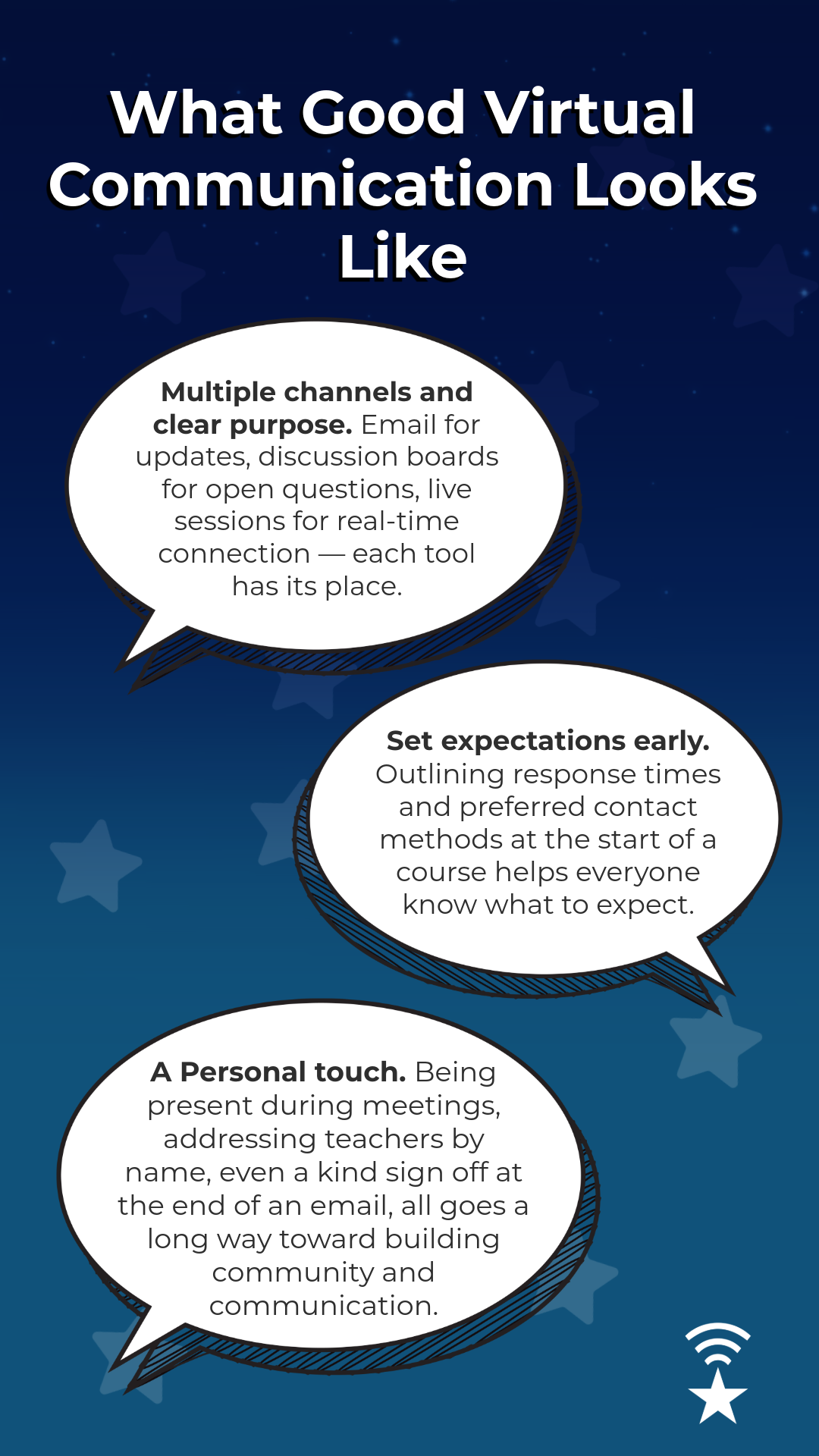
How to Match the Message to the Channel
Use email or a portal message when you have a specific question.
Join an optional daily live lesson or a tutoring session when something needs a real-time explanation.
Schedule a one-on-one when an email thread hits three replies.
Post on the discussion boards when your question is one other families likely share.
Pick up the phone when a written exchange starts to feel tense, because five minutes on a call usually resolves what four emails could not.
When to Reach Out
During the First Week
A short introduction costs almost nothing and changes the tone of every message after it. The sooner you establish that line of communication, the easier it is to develop your academic relationship.
Before a Grade Drops, Not After
A quick "I'm struggling with this concept" is far more useful than an explanation after a missed assignment. In an asynchronous school this matters more than usual, because a teacher may not see the struggle until it shows up as a score. If work has already piled up, start with our guide on catching up without burning out.
Attendance and Reporting an Absence
Attendance at Stellar Oaks is measured by participation rather than a seat in a room. Students are expected to log in and complete assigned lessons daily, and days without completed work can be marked absent. The school reports attendance to the state and follows Iowa truancy requirements, so an unexplained gap is not a small thing. Take a look at ourFAQ page for more information on the current policy.
Iowa Weather Days
An ice storm that takes out power or internet is an attendance question and a communication question at the same time. Decide in advance who you would notify, from a phone if necessary, and ask early how teachers handle missed live lessons during weather events.
IEP, 504, and Special Education
Stellar Oaks has a special education program, and enrollment includes a review to determine whether the school can meet a student's needs online. Start that conversation before the school year begins. Once enrolled, confirm in the first two weeks that every teacher has current documentation and make sure to ask how accommodations work in an asynchronous course.
How to Write a Message That Gets a Fast Reply
A Template for Everyday Questions
"Hi [Teacher], my student is working on [assignment or unit] in [course]. They are stuck on [specific step or concept]. They have already tried [what they did]. What would you suggest as a next step?"
A Script for Harder Conversations
For a grade concern or feedback that did not sit right, try: "I wanted to check in about [specific issue]. Can you help me understand [specific question]? I want to make sure we are on the same page before this becomes a bigger problem." It is specific, it assumes good intent, and it invites a conversation rather than starting an argument.
How to Follow Up
After a call or live session, send a quick "just confirming what we discussed" email. Ninety seconds, and everyone has the same record.
Five Communication Breakdowns Worth Avoiding
The Silent Struggle
A confused student who says nothing, hoping it will click eventually. Normalize reaching out before a grade drops, not after.
The One-Word Email
"I don't get it" gives a teacher nothing to work with. Name the concept, the assignment, or the step.
The Assumption Spiral
A slow reply reads as "they don't care" when it is usually a busy inbox. Check the stated response window first.
The Parent-as-Only-Messenger Pattern
When every message routes through a parent, students miss the chance to build their own advocacy and communication skills.
The Missed Portal Notification
Alerts are easy to mute and easier to ignore. Decide in week one which notifications actually reach you and turn the rest off.
Helping Your Student Speak Up
Encourage direct student-to-teacher contact whenever it is age appropriate, with a parent looped in rather than standing in the middle. Our student guide to starting virtual school covers this from the student's side.
Your First-Week Communication Checklist
Save each teacher's preferred contact method and stated response time.
Introduce yourself and your student.
Log in to the student portal and the support portal once, before you need either.
Set portal notifications so alerts reach you.
Ask directly what "good communication" looks like from each teacher's perspective.
Say up front if your family travels, works irregular hours, or has a preferred contact window.
Confirm the absence reporting process before the first snow day, not during it.
Frequently Asked Questions About Virtual School Communication in Iowa

How often should I hear from my child's teacher?
Expect progress notes, deadline reminders, and portal grade updates. If it feels sparse, ask directly what to expect rather than waiting.
What if I don't hear back right away?
Most teachers outline a response window in advance, often 24 to 48 hours on school days. If a second message goes unanswered, contact the student support team.
Who do I contact for a tech problem versus a course problem?
Logins and account access go to the support portal. Coursework, grades, and deadlines go to the teacher.
Can my student email their teacher directly?
Yes, and for middle and high school students it is worth encouraging. Younger students generally need more parent involvement.
How do I contact the principal at an online school?
The same way you would contact any other staff member, through email or a portal message. The principal is the escalation point when an issue has not been resolved at the teacher or support level.
My message came across the wrong way. What now?
A quick "I want to make sure that came across the way I meant it" resolves most of these before they turn into friction.
Start the Year With a Communication Plan
Virtual school doesn’t lack connection, it just asks everyone to be a little more deliberate about building it. A quick email, a well-timed question, and a habit of assuming good intent go further than almost anything else in making the year run smoothly.
Ready to join a school that puts communication first? Enroll today at Stellar Oaks Virtual Academy.
Follow us for updates all year long: Facebook |Instagram
Have a question right now? Our enrollment specialists are happy to talk: 915-306-3446
